■VPC(例: 10.0.0.0/16)
サブネット(Cloud SQL 用・??: 10.10.0.0/24(例: us-central1、VPC内)
サブネット(VPCコネクタ用・??: 10.8.0.0/28(RunからVPCへ通信用、VPC外)
VPC コネクタのサブネット縺? 10.8.0.0/28 のような藹??さな軆??囲を使用、VPC外だがrun自臀??がVPC外だから?
VPC コネクタはリージョン単位なので、Cloud Run 縺? Cloud SQL を同じリージョンに配置するのが望ましい
Google Cloudの内驛?NW設鐔??によりVPC内の異なるサブネット間でも通信可閭?
VPC内なら異なるリージョンのサブネットでもOK(VPC自臀??には軆??囲を設藹??なしでサブネット縺?IPが被らなけれ縺?OKか縺?
追加の設定なしで、例え縺? us-central1 縺? VM から asia-northeast1 縺? Cloud SQLに直接アクセス藹??
■対象アセットに対する付荳?可能なロールの臀??覧表遉?
Full Resource Name(フルでのアセット名を探せる)
import google.auth
import googleapiclient.discovery
def view_grantable_roles(full_resource_name: str) -> None:
credentials.google.auth.default(
scopes=["https://www.googleapis.com/auth/cloud-platform"]
)
service = googleapiclient.discovery.build('iam', 'v1', credentials credentials)
roles = (
service roles()
queryGrantableRoles (body=["fullResourceName": full_resource_name}).execute()
)
for role in roles["roles"]
if "title" in role:
print("Title: role["title"])
print("Name: role["name"])
if "description" in role:
print("Description:" + role["description"])
print("")
project_id = "prj"
#resource = f"//bigquery.googleapis.com/projects/prj/datasets/ds"
#resource + f"//bigquery googleapis.com/projects/prj/datasets/ds/tables/tbl"
resource = f"//cloudresourcemanager.googleapis.com/projects/{project_id}"
view_grantable_roles(resource)
■ロールの臀??覧表遉?
■ロールの臀??覧表遉?
https://cloud.google.com/iam/docs/roles-overview?hl=ja#role-types
1)事前定義ロールの場合縺? roles.get() を使用します。
2)プロジェクトレベルのカスタムロールの場合は、projects.roles.get() を使用します。
3)組織レベルのカスタムロールの場合は、organizations.roles.get() を使用します。
これら3種饅??で全てを網軆??すると思繧?れます
projectIDがsys-のもの縺?GAS、lifecycleStateがACTIVE以藹??のものも含まれるので注諢?
■bqへの書き込縺?
■bqへの書き込縺?
export GOOGLE_APPLICATION_CREDENTIALS="path/to/your-service-account-key.json"
pip install google-cloud-bigquery
from google.cloud import bigquery
client = bigquery Client()
#書き込み先のテーブル情蝣?
table_ref = f"{project_id}.{dataset_id}.{table_id}"
#サンプルデータの生成
def generate_sample_data(num_rows)
data = [
{
"organization": f"org_(num_rows)",
"permission". "view",
}
for _ in range(num_rows)
]
return data
data_to_insert = generate_sample_data(5000)
errors = client.insert_rows_json(table_ref, data_to_insert)
if errors:
print("Errors occurred: {errors}")
else:
print("Data successfully written to BigQuery!")
■データカタロ繧?
データアセットを検索する | Data Catalog Documentation | Google Cloud
Class SearchCatalogRequest (3.23.0) | Python client library | Google Cloud
サンプルで臀??様書縺?APIを使っているがqueryが空白刻みで入れる等の使い方が分かる
■BQスキーマ+ポリシータグ藹??得
■ポリシータグ設定
Class SearchCatalogRequest (3.23.0) | Python client library | Google Cloud
サンプルで臀??様書縺?APIを使っているがqueryが空白刻みで入れる等の使い方が分かる
■BQスキーマ+ポリシータグ藹??得
from google.cloud import bigquery
def get_policy_tags_from_bq_table(project_id, dataset_id, table_id):
print("################ bigquery.Client.get_table().schema start ################")
print(f"Target table: {project_id}.{dataset_id}.{table_id}")
bq_client = bigquery.Client()
table = bq_client.get_table(f"{project_id}.{dataset_id}.{table_id}")
schema = table.schema
policy_tags = []
for field in schema:
print(f"Column: {field.name}")
if field.policy_tags:
tags = [tag for tag in field.policy_tags.names]
policy_tags.extend(tags)
print(f"Policy Tags: {tags}")
else:
print("> No Policy Tags assigned.")
return policy_tags
PROJECT_ID = "prj"
DATASET_ID = "ds"
TABLE_ID = "test001"
policy_tags = get_policy_tags_from_bq_table(PROJECT_ID, DATASET_ID, TABLE_ID)
print("Collected Policy Tags:", policy_tags)
■ポリシータグ設定
from google.cloud import datacatalog_v1
from google.cloud import bigquery
PROJECT_ID = "prj"
DATASET_ID = "ds"
TABLE_ID = "tbl01"
COLUMN_NAME = "aaa"
POLICY_TAG_PROJECT = "prj"
POLICY_TAG_NAME = "projects/prj/locations/us/taxonomies/83893110/policyTags/11089383"
def list_taxonomy_and_policy_tag():
print("############# Start #############")
list_policy_tags = []
client = datacatalog_v1.PolicyTagManagerClient()
request = datacatalog_v1.ListTaxonomiesRequest(
parent=f"projects/{POLICY_TAG_PROJECT}/locations/us"
)
try:
page_result = client.list_taxonomies(request=request)
except google.api_core.exceptions.PermissionDenied as e:
print(f"Skipping project {POLICY_TAG_PROJECT} due to PermissionDenied error: {e}")
return []
except Exception as e:
print(f"An error occurred for project {POLICY_TAG_PROJECT}: {e}")
return []
for taxonomy in page_result:
print(f"############ Taxonomy display_name: {taxonomy.display_name} #############")
print(f"############ Taxonomy name: {taxonomy.name} #############")
request_tag = datacatalog_v1.ListPolicyTagsRequest(parent=taxonomy.name)
try:
page_result_tag = client.list_policy_tags(request=request_tag)
except Exception as e:
print(f"Error on {request_tag}: {e}")
break
for policy_tag in page_result_tag:
print("Policy tag:")
print(policy_tag)
list_policy_tags.append({
"project_id": POLICY_TAG_PROJECT,
"taxonomy_display_name": taxonomy.display_name,
"taxonomy_name": taxonomy.name,
"policy_tag_name": policy_tag.name,
"policy_tag_display_name": policy_tag.display_name,
})
return list_policy_tags
def update_table_schema_with_policy_tag(list_policy_tags):
for policy_tag in list_policy_tags:
if policy_tag['policy_tag_name'] == POLICY_TAG_NAME:
print(
f"Target policy tag:\n"
f" Project ID: {policy_tag['project_id']}\n"
f" Taxonomy Display Name: {policy_tag['taxonomy_display_name']}\n"
f" Taxonomy Name: {policy_tag['taxonomy_name']}\n"
f" Policy Tag Name: {policy_tag['policy_tag_name']}\n"
f" Policy Tag Display Name: {policy_tag['policy_tag_display_name']}"
)
client = bigquery.Client()
table_ref = f"{PROJECT_ID}.{DATASET_ID}.{TABLE_ID}"
table = client.get_table(table_ref)
new_schema = []
for field in table.schema:
if field.name == COLUMN_NAME:
new_schema.append(
bigquery.SchemaField(
name=field.name,
field_type=field.field_type, # Keep original field type
mode=field.mode, # Keep original mode
description=field.description,
policy_tags=bigquery.PolicyTagList([POLICY_TAG_NAME]),
)
)
else:
new_schema.append(field)
table.schema = new_schema
updated_table = client.update_table(table, ["schema"])
print(
f"Updated table {updated_table.project}.{updated_table.dataset_id}.{updated_table.table_id} schema\n"
f"with policy_tag {POLICY_TAG_NAME} on the column {COLUMN_NAME} successfully."
)
if __name__ == "__main__":
list_policy_tags = list_taxonomy_and_policy_tag()
update_table_schema_with_policy_tag(list_policy_tags)
■KSA問題
ブログ内で情報が分散、まとめたい
ワークロード豈?縺?KSA1縺?
ksa縺?token縺?k8s api用縺?gcp apiに使えない、exprireしない問題がある> Workload identity で解決する
ワークロード豈?縺?KSA1縺?
ksa縺?token縺?k8s api用縺?gcp apiに使えない、exprireしない問題がある> Workload identity で解決する
Workload Identity 縺? KSA縺?GSAの軆??づけで、Workload Identity Federationとは違う
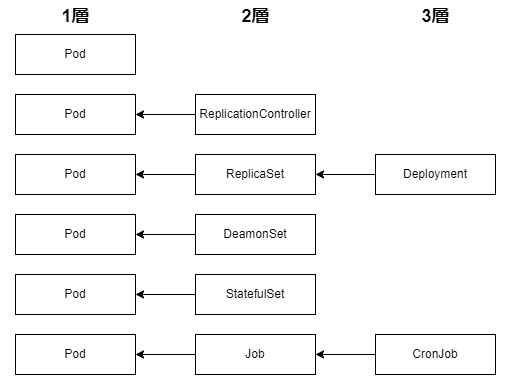
Workload Identity がGKE クラスタで有効化されると、gke-metadata-server という DaemonSet がデプロ繧?
workloads がk8sの用鐔??でリソースの軆??称で、そ縺?identityであり権限管理、縺?Federationは更に藹??部連謳?
ワークロードは、pod, deplyment, StatefulSet, DaemonSet, job, CronJob, ReplicationController, ReplicaSet
Workload Identity がGKE クラスタで有効化されると、gke-metadata-server という DaemonSet がデプロ繧?
gke-metadata-server 縺? Workload Identity を利用する上で藹??要な手続きを実行
SAの軆??づけ
/// 現鐔??
Workload identityを有効にし縺?(autopilot でデフォルト有蜉?)
GCP側縺?KSA縺?GSAをIAM policy binding
k8s側縺?KSA縺?GSAをkubectl annotate
pod縺?KSAを設藹??
↓
/// 新型縺?KSA直接bind
workload identity federation ならGSAがな縺?なりKSAを直接bindできる
Workload identityを有効にし縺?(autopilot でデフォルト有蜉?)
GCP側縺?KSA縺?IAM policy binding
※混在するので現鐔??のままが良いようです
■Workload identity federation(GCP外との連携・??
Workload Identity Federation の臀??組縺?
Workload Identity Federation の臀??組縺?
まずWIF用縺?SAを作成する>SAに権限を付荳?する>
1)Workload identity provider+SAの情報をgithub actionに埋めて使う
GitHub Actions から GCP リソースにアクセスする用途
GitHub Actions から GCP リソースにアクセスする用途
2)Workload identity poolから構成情報をDLしAWSアプリに埋めて使う
AWSからGCP リソースにアクセ繧?する用途
AWSからGCP リソースにアクセ繧?する用途
gcloud auth login-cred-file=構成情報ファイルパ繧?
3)Workload identity poolから構成情報をEKS縺?OIDC ID token のパスを指定しDL
EKS から GCP リソースにアクセ繧?する用途
EKS から GCP リソースにアクセ繧?する用途
- EKSのマニフェストのサービスアカウントのア繝?テーション縺?IAMロールを記載
- EKSのサービスアカウントを使用したい Podのア繝?テーションに追加
- マウント先のパスを環藹??変謨? GOOGLE APPLICATION_CREDENTIALS に設定
- Pod内縺?SDK またはコマンドに縺?GCP リソースヘアクセス可能か確鐔??